Truck & commercial vehicle diagnostics

Heavy Duty Diagnostic Tools – Truck & Commercial Vehicle Scanners

Heavy-duty vehicles use diagnostic systems that differ from ordinary passenger-car OBD2 applications. If you diagnose trucks, buses, commercial vehicles or heavy equipment, choose a tool designed for the communication protocols and vehicle systems you actually work with.

Quick selection

Which Heavy-Duty Diagnostic Tool Should You Choose?

The choice is mainly between a dedicated standalone heavy-duty scanner and a professional workshop platform that can be expanded for trucks and commercial vehicles.

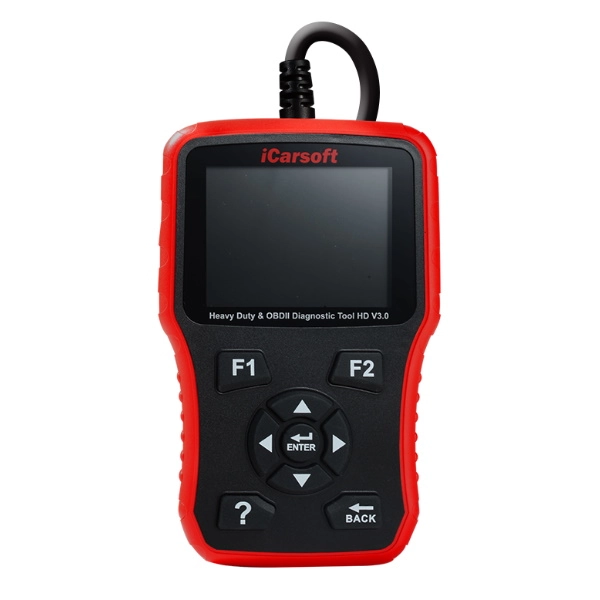
iCarsoft HD V3.0 heavy duty diagnostic tool

Standalone heavy-duty diagnostics

iCarsoft HD V3.0

A dedicated heavy-duty diagnostic tool for users who need fault-code diagnostics and live sensor data without building a larger workshop platform.

  • Designed for heavy vehicles
  • Supports J1587, J1708 and J1939
  • Reads and clears faults from supported control units
  • Displays live sensor data
  • Free software updates
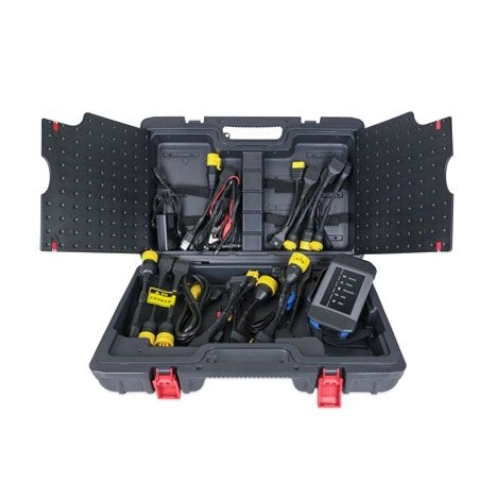
Launch X-431 HD package for truck and commercial vehicle diagnostics

Professional workshop expansion

Launch X-431 HD Package

An expansion package for compatible Launch X431 platforms when heavy equipment and commercial-vehicle diagnostics need to be added to an existing professional workshop system.

  • Heavy equipment and commercial-vehicle applications
  • Includes HD module, software and adapters
  • Compatible with Launch X431 PRO 4, PRO 5 and EURO TURBO 2
  • Built for professional workshop use
  • Expands an existing compatible X431 platform
Want the simplest answer? Choose iCarsoft HD V3.0 if you need a dedicated standalone heavy-duty diagnostic tool. Choose the Launch X-431 HD Package if you already use a compatible professional Launch platform and want to extend it into truck and commercial-vehicle diagnostics.

Side-by-side

iCarsoft HD V3.0 vs Launch X-431 HD Package

These products solve different problems. HD V3.0 is a complete standalone diagnostic tool, while the Launch HD Package is an expansion for selected X431 workshop platforms.

Feature iCarsoft HD V3.0 Launch X-431 HD Package
Product type Standalone heavy-duty scanner Expansion package for compatible X431 tools
Main use Heavy-vehicle fault diagnostics Professional heavy equipment & commercial-vehicle diagnostics
J1587 / J1708 / J1939 Supported Use depends on the Launch HD application, vehicle and supplied adapter set
Fault-code diagnostics Yes, on supported systems Yes, through the compatible X431 platform
Live data Yes Available through the compatible X431 platform
Requires another diagnostic tablet No Yes
Compatible Launch platforms Not required PRO 4, PRO 5, EURO TURBO 2
Best suited for Independent heavy-duty diagnostics at a lower entry level Workshops already using a compatible Launch X431 platform

Heavy-Duty Scanner vs Passenger-Car OBD2 Scanner

A passenger-car OBD2 scanner and a heavy-duty diagnostic tool are not interchangeable simply because both are used for fault diagnosis.

Passenger-Car OBD2 Scanner

Best when: you work mainly with cars and light vehicles using standard passenger-car diagnostic coverage.

These tools are designed around passenger-car control systems and common OBD2 functions. For normal car diagnostics, start with our OBD2 scanner guide instead.

Compare OBD2 Scanners →

Dedicated Heavy-Duty Scanner

Best when: trucks, buses or other heavy vehicles are the main diagnostic target.

A dedicated heavy-duty tool such as iCarsoft HD V3.0 is built around heavy-vehicle communication standards including J1587, J1708 and J1939.

View iCarsoft HD V3.0 →

Professional HD Platform

Best when: the same workshop needs broad passenger-car diagnostics and a route into commercial-vehicle diagnostics.

A compatible Launch X431 platform can be expanded with the X-431 HD Package instead of maintaining a completely separate professional ecosystem.

Compare Launch X431 Tools →

What Should a Heavy-Duty Diagnostic Tool Cover?

Start by matching the scanner to the vehicles, diagnostic connector and communication systems you actually need to access.

Heavy-Vehicle Protocols

For iCarsoft HD V3.0, the listed heavy-duty protocol support includes J1587, J1708 and J1939.

Control-Unit Fault Codes

A useful heavy-duty scanner should be able to read and clear diagnostic trouble codes from supported vehicle control units rather than only provide a generic engine-code view.

Live Sensor Data

Live data helps move diagnosis beyond a stored fault code by showing sensor and operating values while the vehicle is being tested.

Adapters & Connections

Commercial vehicles can require different diagnostic connectors and adapter sets. The Launch X-431 HD Package is supplied specifically as a module, software and adapter expansion for compatible X431 devices.

Vehicle Type

Truck, bus, commercial-vehicle and heavy-equipment coverage should be evaluated separately from ordinary passenger-car coverage.

Workshop Expansion

If you already use Launch professionally, expanding a compatible X431 platform can be more practical than adding a second unrelated workshop system.

Heavy-Duty Diagnostic Compatibility

The correct scanner depends on both the vehicle and the diagnostic system it uses.

iCarsoft HD V3.0

HD V3.0 is listed for heavy vehicles using J1587, J1708 and J1939. It provides supported control-unit fault-code diagnostics and sensor-data monitoring as a standalone device.

Launch X-431 HD Package

The Launch HD Package expands compatible X431 platforms for heavy equipment and commercial-vehicle applications and includes the required HD module, software and adapters.

Compatible Launch Platforms

The current X-431 HD Package is listed as compatible with Launch X431 PRO 4, PRO 5 and EURO TURBO 2.

Start with the Vehicle

Before choosing a heavy-duty scanner, identify the exact vehicle type, model, year and diagnostic connector. That determines whether a standalone HD tool or a professional platform expansion is the better route.

Heavy-Duty Diagnostic Tool FAQ

What is a heavy-duty diagnostic tool?

It is a diagnostic scanner designed for trucks, buses, commercial vehicles or heavy equipment rather than only passenger-car OBD2 systems. Heavy-duty tools may support communication standards and adapter systems that differ from ordinary car scanners.

Does iCarsoft HD V3.0 support J1939?

Yes. The current HD V3.0 product specification lists J1587, J1708 and J1939 support for heavy-vehicle diagnostics.

Can iCarsoft HD V3.0 show live data?

Yes. Its listed functions include monitoring sensor values in addition to reading and clearing faults from supported control units.

Is the Launch X-431 HD Package a complete standalone scanner?

No. It is an expansion package for compatible Launch X431 diagnostic devices. The package adds the HD module, software and adapter set needed for heavy equipment and commercial-vehicle applications.

Which Launch scanners work with the X-431 HD Package?

The current product listing specifies Launch X431 PRO 4, PRO 5 and EURO TURBO 2 as compatible platforms.

Can I use a normal OBD2 scanner on a truck?

A passenger-car OBD2 scanner should not be assumed to provide full heavy-duty coverage. For truck or commercial-vehicle diagnostics, choose a tool and adapter system that explicitly supports the vehicle and its diagnostic protocol.

Choose the Heavy-Duty Diagnostic Platform That Matches Your Workshop

Use iCarsoft HD V3.0 for a straightforward standalone heavy-vehicle scanner, or expand a compatible Launch X431 platform with the HD Package for professional commercial-vehicle diagnostics.

Hit enter to search or ESC to close