
How to Read OBD2 Live Data – PIDs Explained
OBD2 live data shows what the engine control system is seeing while the vehicle is running. Instead of only reading a stored fault code, you can watch sensor values, calculated values and control corrections change in real time.
Live data is one of the most useful diagnostic functions in an OBD2 scanner because it helps answer a more important question than “what code is stored?”: what is the engine doing right now?
What Is OBD2 Live Data?
Standard OBD2 live data is requested from the vehicle through diagnostic services defined by SAE J1979. The individual data items are commonly called PIDs, or Parameter IDs.
Depending on the vehicle and scanner, live data can include:
- Engine RPM
- Calculated engine load
- Coolant temperature
- Short-Term and Long-Term Fuel Trim
- MAF airflow
- MAP pressure
- Oxygen or air-fuel ratio sensor data
- Throttle position
- Vehicle speed
- Fuel pressure where supported
Not every vehicle supports every standard PID, and manufacturer-specific diagnostic software may provide much more data than generic OBD2.
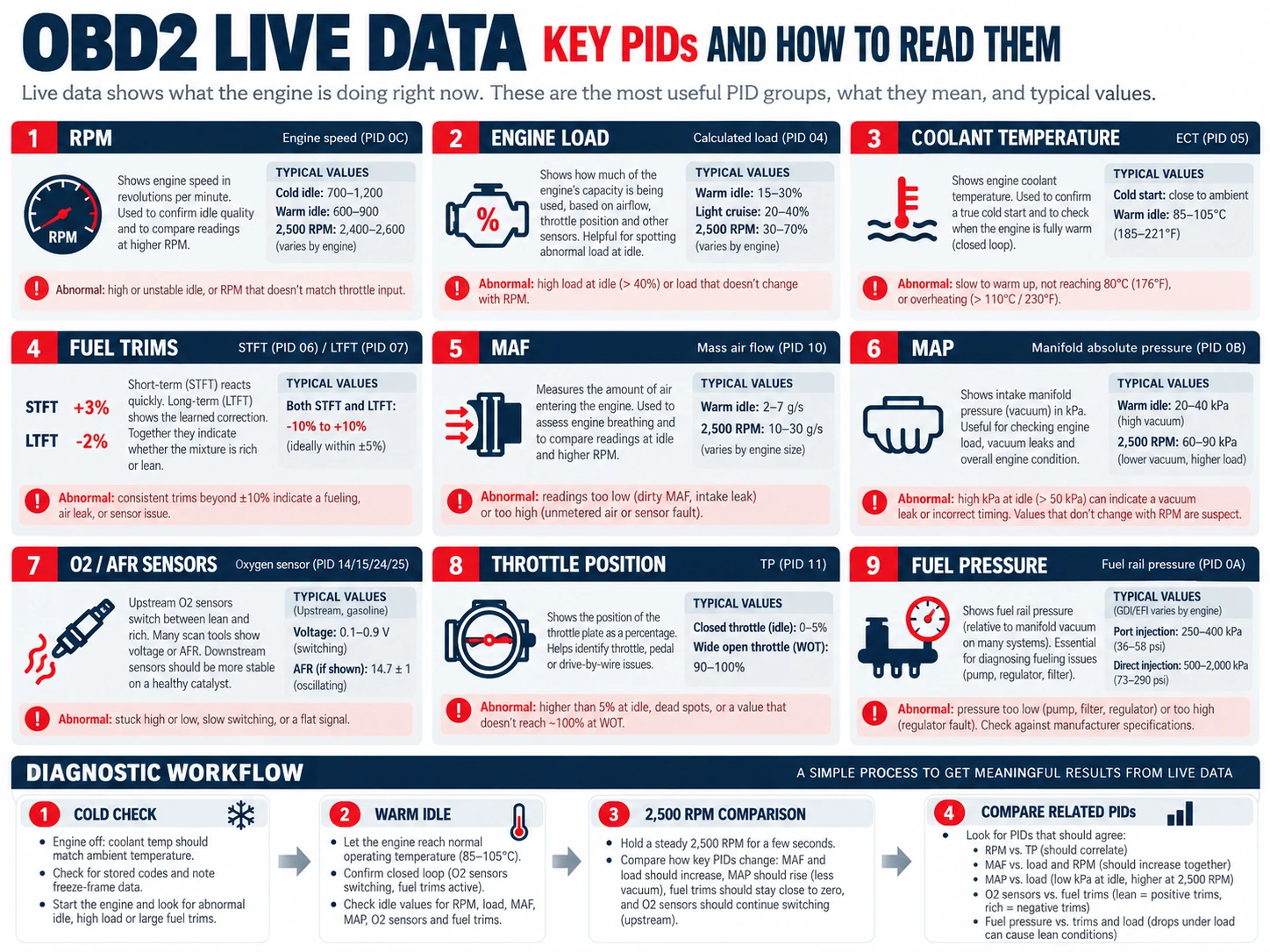
What Is a PID?
A PID is a standardized identifier used to request a specific diagnostic value. The scan tool asks the vehicle for a supported parameter and then converts the returned data into a readable value such as degrees Celsius, RPM, percent, grams per second or kilopascals.
The important point for diagnosis is not the PID number itself. What matters is understanding what the value represents, what operating condition it was recorded under and how it compares with related data.
The Most Useful OBD2 Live Data PIDs
Engine RPM
RPM is basic context for almost every live-data test. A sensor reading at idle may be normal but abnormal at 2,500 RPM or under load.
Calculated Engine Load
Calculated load helps show how hard the ECU believes the engine is working. It is useful when comparing readings at idle, cruise and acceleration.
Engine Coolant Temperature
Coolant temperature affects fuel control, idle strategy and many emissions functions. On a cold engine, the reading should normally be close to ambient temperature. As the engine warms, the value should rise smoothly toward normal operating temperature.
Fuel Trims
Short-Term Fuel Trim (STFT) and Long-Term Fuel Trim (LTFT) show how much the ECU is correcting the fuel mixture. Positive values mean the ECU is adding fuel; negative values mean it is removing fuel.
Read our complete Fuel Trims guide →
MAF – Mass Air Flow
The MAF sensor reports the amount of air entering the engine. MAF data can help diagnose airflow measurement errors, intake problems and some lean or rich conditions.
Do not judge a MAF sensor from one universal number. Engine size, RPM, load, turbocharging and operating conditions all affect airflow.
MAP – Manifold Absolute Pressure
MAP data reflects intake manifold pressure. On engines that use a MAP sensor for load calculation, the value can help identify vacuum, boost or load-related problems.
Oxygen and Air-Fuel Ratio Sensor Data
Upstream oxygen or air-fuel ratio sensors provide feedback used for mixture control. The exact data format depends on the sensor type and vehicle. Traditional narrowband oxygen sensors are interpreted differently from wideband air-fuel ratio sensors.
A code that mentions an oxygen sensor does not prove the sensor itself is faulty. Compare the sensor signal with fuel trims and other operating data before replacing parts.
Throttle Position
Throttle position can help verify whether the ECU sees the driver request and whether an electronic throttle system responds as expected. Some vehicles expose several throttle- and pedal-related values.
Fuel Pressure
Some vehicles provide fuel pressure through generic or enhanced live data. Where available, it can be valuable for diagnosing lean conditions, hard starting and load-related fuel-delivery problems.
How to Read OBD2 Live Data Step by Step
1. Scan the Vehicle for Fault Codes First
Read stored and pending codes before clearing anything. The codes give you the systems and operating conditions that deserve attention.
2. Check the Data With the Engine Cold
Before starting the engine, compare temperature-related sensors with the actual ambient conditions. A coolant or intake-air temperature reading that is clearly implausible before startup can immediately point toward a sensor or wiring problem.
3. Start the Engine and Watch the Warm-Up
Look for values that should change smoothly as the engine warms. Coolant temperature should rise progressively, and the fuel system should move into closed-loop control when the required conditions are met.
4. Check Data at Warm Idle
At normal operating temperature, record the key values. Fuel trims, airflow, MAP, RPM and oxygen-sensor data are especially useful together.
5. Compare Idle With Approximately 2,500 RPM
Holding the engine at a steady higher RPM can reveal patterns that are hidden at idle. For example, strongly positive fuel trims that improve at higher RPM often point toward unmetered air, while trims that remain strongly positive across both conditions can suggest a wider fuel-delivery or airflow-measurement problem.
6. Compare Related PIDs, Not One Value in Isolation
A single abnormal-looking number is rarely enough for a diagnosis. Compare values that should agree with each other. For example:
- Fuel trims with MAF and oxygen-sensor data
- Coolant temperature with cold-start conditions
- Throttle position with RPM and calculated load
- MAP with engine load and throttle opening
Common Live Data Patterns
| Live-data pattern | Diagnostic direction |
|---|---|
| Positive fuel trims mainly at idle | Check for vacuum or unmetered-air leaks |
| Positive fuel trims at idle and higher RPM | Check fuel delivery, airflow measurement and broader lean causes |
| Coolant temperature implausible when engine is cold | Check sensor reading, wiring and reference voltage |
| One bank differs significantly from the other | Investigate bank-specific intake, injector, exhaust or sensor faults |
| Throttle input changes but engine response does not | Compare pedal, throttle and related control values before testing components |
Generic OBD2 Data vs Manufacturer-Specific Live Data
Generic OBD2 focuses mainly on emissions-related powertrain information. A manufacturer-specific or full-system scanner can often access much more, including ABS, airbag, transmission, body, battery management and other control units.
This distinction matters when choosing a diagnostic tool. Two scanners may both advertise “live data” while offering very different coverage.
Why Live Data Can Be Misleading
- A value can be technically valid but wrong for the current operating condition
- Scan-tool refresh rate can be too slow to catch a brief event
- Different scanners may label the same parameter differently
- Some values are calculated by the ECU rather than directly measured
- Manufacturer-specific systems may use data that generic OBD2 does not expose
Always interpret live data in context and compare several related parameters before drawing a conclusion.
What Scanner Do You Need for Live Data?
For basic engine diagnosis, choose an OBD2 scanner that can display and preferably graph live data. Useful functions include selectable PIDs, graphing, recording and the ability to view several related parameters at the same time.
For deeper vehicle diagnosis, manufacturer-specific or professional scanners provide access to more control units and enhanced data.
Related Diagnostic Guides
- Fuel Trims Explained – How to Read STFT and LTFT
- OBD2 Freeze Frame Data – How to Read It
- OBD2 Fault Code Library
OBD2 Live Data FAQ
What does PID mean in OBD2?
PID means Parameter ID. It identifies a diagnostic data item that a scan tool can request from the vehicle.
Is OBD2 live data the same on every car?
No. Standard OBD2 defines common emissions-related parameters, but support varies by vehicle. Manufacturer-specific diagnostics can provide many additional values.
Can live data tell me exactly which part is bad?
Usually not by itself. Live data helps identify patterns and verify whether a sensor, actuator or control system is behaving as expected. The final diagnosis should use several related values and, when necessary, physical tests.
Should I clear codes before checking live data?
No. Read the stored codes and freeze-frame information first. Clearing codes can erase useful diagnostic information and reset learned values on some vehicles.