
OBD2 Freeze Frame Data – How to Read It Before Clearing Codes
Freeze-frame data is a snapshot of vehicle operating conditions captured when an OBD fault is detected. It can show what the engine was doing when the problem occurred, making it one of the most valuable pieces of evidence available before any codes are cleared.
Reading the code tells you what condition was detected. Reading the freeze frame helps tell you when and under what conditions it happened.
What Is OBD2 Freeze Frame Data?
Freeze-frame data is part of standardized OBD diagnostics. In traditional SAE J1979 terminology, Mode 02 is used to request freeze-frame information associated with an emissions-related diagnostic trouble code.
The exact data available depends on the vehicle, the fault and the scan tool. Common freeze-frame values include:
- Engine RPM
- Vehicle speed
- Calculated engine load
- Engine coolant temperature
- Short-Term and Long-Term Fuel Trim
- MAF airflow
- MAP pressure
- Throttle position
- Fuel-system status
- Other supported emissions-related PIDs
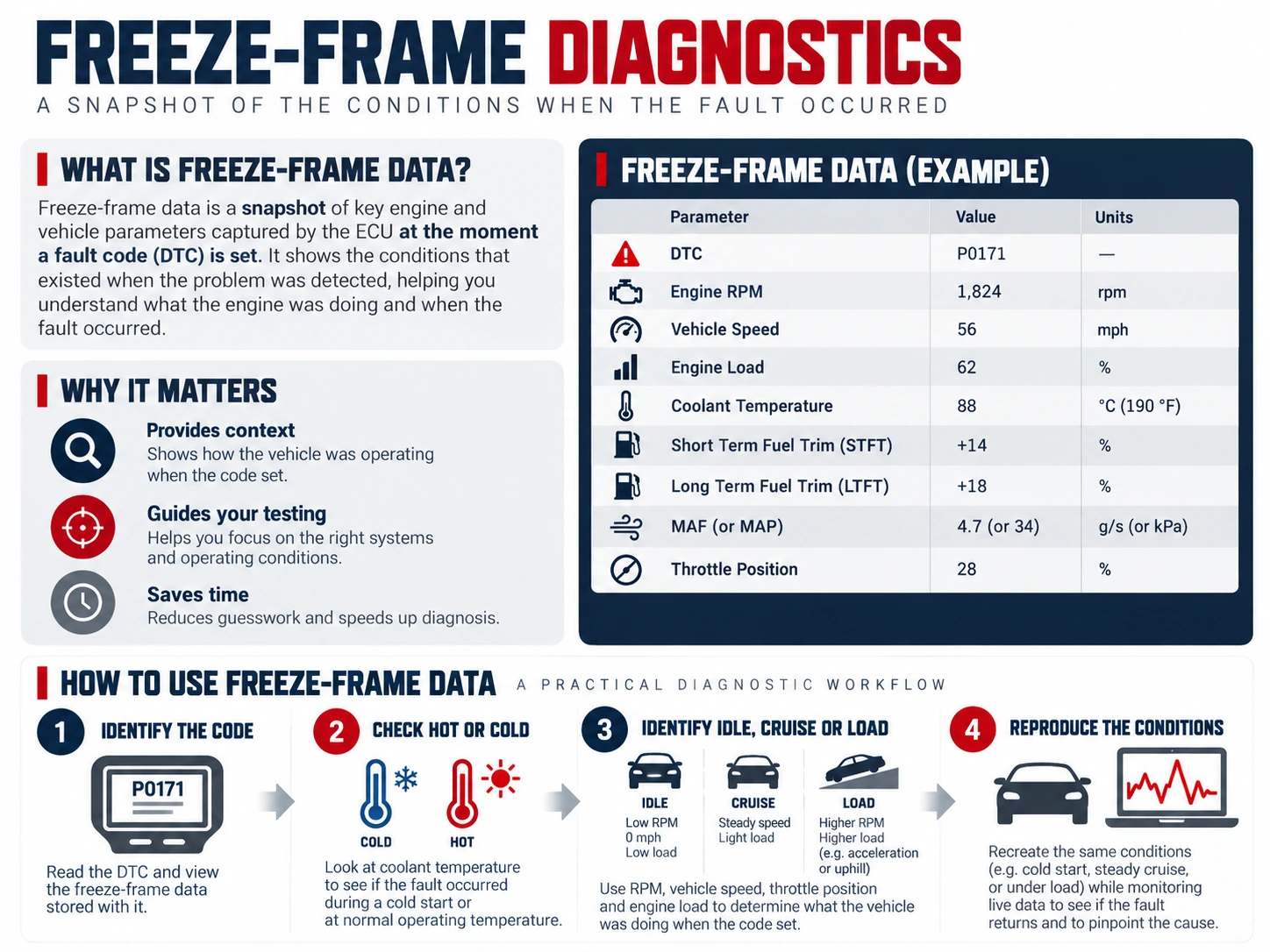
Why Freeze Frame Matters
Many faults are intermittent. By the time the vehicle reaches the workshop, the engine may run normally and the live data may look reasonable.
Freeze frame preserves clues from the moment the fault was detected. It can reveal whether the code occurred:
- At cold start
- At hot idle
- During steady cruise
- During acceleration
- Under high engine load
- At a specific vehicle speed or RPM
This allows you to reproduce the operating condition instead of guessing.
Read Freeze Frame Before Clearing Codes
Always record freeze-frame information before clearing diagnostic trouble codes. Clearing codes can erase the stored snapshot and other useful diagnostic data.
After the information is erased, you may need to wait for the fault to happen again before the same evidence becomes available.
The Most Useful Freeze-Frame Values
Engine RPM
RPM shows whether the fault occurred at idle, moderate engine speed or higher RPM.
Calculated Engine Load
Load helps distinguish a no-load or light-load fault from a problem that occurs when the engine is working hard.
Vehicle Speed
Speed indicates whether the fault occurred while stationary, in urban driving or at road speed.
Coolant Temperature
Coolant temperature tells you whether the engine was cold, warming up or fully warm when the fault was recorded.
Fuel Trims
STFT and LTFT can show whether the ECU was adding or removing fuel when the fault occurred. This is especially useful with lean, rich, misfire and airflow-related codes.
Learn how to interpret fuel trims →
MAF and MAP
Airflow and manifold-pressure data help show engine breathing and load at the time of the event. Compare them with RPM, throttle and load rather than judging one value alone.
How to Read Freeze Frame Step by Step
1. Identify the Code Linked to the Snapshot
Start with the DTC associated with the freeze frame. Some vehicles and enhanced diagnostic systems can store more than one event snapshot, while generic OBD support may be more limited.
2. Decide Whether the Engine Was Cold or Warm
Use coolant temperature and intake-air temperature. A fault that appears only at cold start has a different diagnostic direction from one that occurs only after the engine reaches operating temperature.
3. Determine Idle, Cruise or Load
Compare RPM, vehicle speed, calculated load and throttle position. Together they show the operating condition much more clearly than any one value.
4. Check Fuel-Control Data
Fuel trims can show whether the ECU was correcting lean or rich when the code occurred. Oxygen or air-fuel ratio sensor data may add more context where available.
5. Reproduce the Conditions Safely
Once you know the operating pattern, try to reproduce it while watching live data. Do not attempt unsafe road testing or concentrate on a scan tool while driving. Use a second person, data recording or a controlled workshop procedure where appropriate.
Example: P0171 With Freeze Frame
Suppose a P0171 System Too Lean Bank 1 code has a freeze frame showing:
- Engine fully warm
- Low RPM
- Vehicle speed 0 km/h
- Low calculated load
- High positive fuel trims
This pattern points toward a lean condition occurring at or near idle. A vacuum or unmetered-air leak becomes more interesting than a fault that appears only under heavy load.
If the freeze frame instead showed high engine load and higher RPM, fuel delivery or airflow measurement could move higher on the diagnostic list.
Example: Misfire Code With Freeze Frame
A P030x misfire code recorded during cold start can lead you toward a different test plan than the same code recorded only under high load.
Cold-start misfire clues may point toward ignition, injector, compression or mixture issues that are most visible before the engine warms. A high-load misfire may require testing ignition strength, fuel delivery and mechanical condition under load.
Freeze Frame vs Live Data
| Freeze frame | Live data |
|---|---|
| Snapshot from around the time a fault was detected | Current values while the vehicle is being tested |
| Useful for intermittent faults | Useful for reproducing and confirming the fault |
| Can be lost when codes are cleared | Available whenever the vehicle and parameter support it |
The best diagnostic process uses both. Freeze frame tells you which conditions to reproduce; live data shows whether the fault can be observed again.
Read the OBD2 Live Data guide →
Limitations of Freeze Frame Data
- Not every DTC has a useful generic freeze frame
- The available PIDs vary by vehicle
- A snapshot is not a recording of the entire event
- Some vehicles prioritize or overwrite generic freeze-frame information
- Manufacturer-specific diagnostic systems may provide additional event records beyond generic OBD2
Use freeze frame as evidence, not as a complete diagnosis.
What Scanner Do You Need to Read Freeze Frame?
Most capable OBD2 scanners can read generic freeze-frame data. More advanced tools may provide enhanced event data from additional control units or manufacturer-specific systems.
Related Diagnostic Guides
Freeze Frame FAQ
Does every fault code have freeze-frame data?
No. Availability depends on the vehicle, code and diagnostic implementation.
Can I view freeze frame after clearing codes?
Usually the associated generic diagnostic information is cleared when codes are erased, so record it first.
Is freeze frame the same as a data log?
No. Freeze frame is a snapshot. A data log records values over time and is better for capturing how a fault develops.
What should I look at first in freeze frame?
Start with the code, coolant temperature, RPM, speed, load and fuel-control values. These usually tell you whether the fault occurred cold or warm, at idle or under load.